Active development · macOS 14+

Read, mark and cite the papers on your Mac.

PaperShelf is a PDF reader and research library. It searches every page, scans included, keeps highlights that mean something, and lets Claude, Codex or ChatGPT answer from your shelf with the passage and the page, without a file leaving the machine.

Latest release · v1.20.1
brew tap jonaprieto/papershelfbrew trust --cask jonaprieto/papershelf/papershelfbrew install --cask papershelfbrew update && brew upgrade --cask papershelfAd-hoc signed while notarization is on the roadmap.
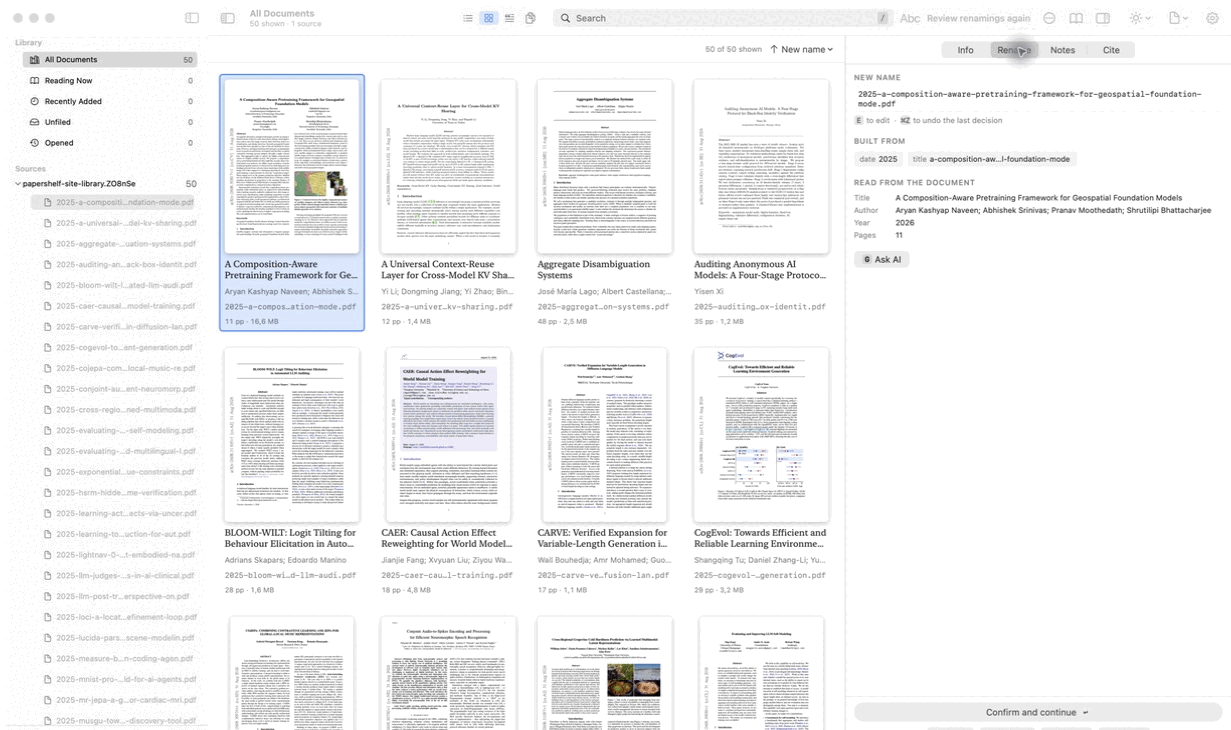
PaperShelf catalogue showing a real collection of research papers
01 · Read

Keep the page and the thought together.

A PDF reader you can drive from the keyboard: H, J, K and L to scroll, tabs, a split view, four page colours and presentation mode on ⌃⌘F, with a highlight language you can extend, edit, and scope to a paper, project, folder, or whole library.

Make the vocabulary yours.

Start with five defaults. Add roles, rename them, change their colors, and override one paper or project without changing the rest of the library.

Highlighters
Worth remembering
Agree, or confirmed
Definition or key term
Disagree, or doubtful
Follow up

The notes rail follows the mark.

Select a highlight in the page and its matching note is selected in the inspector. Add a note, dictate one, or export the complete Markdown. Marks made in Preview or Acrobat arrive here too.

A passage worth remembering stays visible beside the note that explains why.
Worth remembering
p. 3
Follow up
p. 7
02 · Find

Search like you remember.

Use the query language when you know what you want, or press ⌘K when you only know that the feature exists.

Queries stay legible.

Search by title, author, abstract, text, folder, tag, year, pages, or size, and remove each filter as a chip.

Search
text: dependent colimityear: 2024tag: follow-up
18 papers · sorted by relevance

The palette makes the app discoverable.

Commands, tags, projects, documents, passages, pages, and shortcuts all live behind one native command surface.

⌘K · six prefixes
> commands
# tags
@ projects
/ passages
: page number
? shortcuts
03 · Keep in order

Every move gets a review.

PaperShelf proposes names, shows what changes, keeps originals when you ask, and gives the reviewer the final word.

Names are made from parts.

Drag a pattern into place, preview the result, and keep the text form beside it.

dateauthortitleyear
2025-kashyap-composition-aware-pretraining.pdfBuilt from date · author · title

The watcher catches the next copy.

When a watched folder changes, PaperShelf checks new files against the shelf and opens a review before anything is removed.

Folder watcher · active
New filecomposition.pdf
MatchIdentical
NextReview first
04 · Cite

From shelf to bibliography.

Generate a complete BibTeX document from the current selection, with stable keys and missing fields called out where you can fix them.

Readable by people and tools.

Keys follow surname:year:firstword; formatting follows the settings you chose.

@article{kashyap:2026:composition, author = {Kashyap Naveen, Aryan}, title = {A Composition-Aware Pretraining Framework}, year = {2026} }

Complete only when complete.

Missing author, title, or year fields become navigable chips rather than silent blanks.

BibTeX
3 missing authorsComplete onlyWrap
Copy or save the generated file
05 · Connect

Ask your library. Your papers stay put.

The bundled MCP server lets Claude Code, Codex, ChatGPT or any local MCP client search the shelf, read a page, list your highlights and build a bibliography, and answer with the passage and page it came from.

Twenty-six tools, one local process.

Read tools work immediately. File changes and semantic profile writes are explicit and off by default where they can change your files. Bookmark metadata stays local and can be polled by revision. Highlights and their notes are written into the PDF, the same way the reader writes them, and signed with who made them.

MCP tools
list_documentssearch_documentsread_documentbibliographylist_highlightsread_pagefind_duplicateslist_projectslist_project_documentssearch_projectlist_tagsdocuments_by_taglist_bookmarksadd_to_projectset_tagspropose_file_changesapply_file_changesget_highlight_profileset_highlight_profileadd_highlighteradd_bookmarkrename_bookmarkremove_bookmarkadd_highlightupdate_highlightremove_highlight

Install the bridge, not your library.

Settings > Integrations shows the line to paste into Claude Code or Codex, and the server path for any other client. The files remain on this Mac.

AppPaperShelf.app
Serverpapershelf-mcp
Transportstdio
File movesoff by default
06 · Underneath

Quiet infrastructure for a busy shelf.

When a PDF is more than a file, the boring parts matter: conversion, indexing, costs, passwords, activity, and a key that does not sit in a plaintext preference.

Six ways to a paper's text, scans included.

Text layerbuilt in
macOS OCRscans, built in
pdftotextfast default
MarkItDownstructured Markdown
Markerlayout aware
Doclingcomplex documents

Local by design.

API keys live in Keychain when available. Spend is recorded locally. Password lists, plans, activity, and indexes stay in Application Support.

KeyKeychain
TextSQLite + FTS
Notesgenerated Markdown
Roadmap

Useful first. Stable next.

What the next releases are for.

  • Notarized and signed distribution
  • Stable 2.0 storage and plugin interfaces
  • Upstream Homebrew Cask submission
Made for the paper you are actually reading.

Open the page. Keep the thread.

Download the latest build, or read the source and make the next careful improvement.